

Booking an inspection
You book an Autoentic paint inspection online at autoentic.com/book, then bring the car to a partner shop near you, a local business that works with Autoentic. A technician there enters the car's vehicle identification number, or VIN, and the inspection takes about 10 minutes. Autoentic measures the paint thickness on a car's body panels, compares each panel with factory data for that model, and saves the result to the car's VIN as a Paint Passport that anyone can look up free.
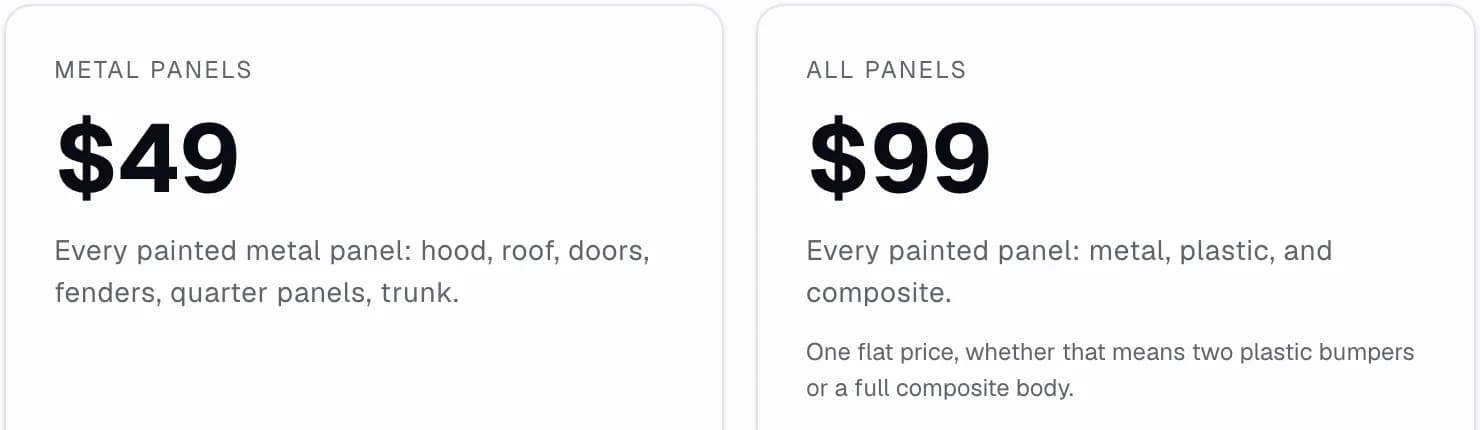
An inspection is priced per car, not per panel. Metal Panels costs $49 a car and measures the metal body panels. All Panels costs $99 a car and measures metal and plastic panels. After you book, you can move or cancel the visit from the links in your booking emails.
What you're booking
An inspection gives each measured panel a label, such as Factory Original or Refinished, and saves the result to the car's Paint Passport. Reading a Paint Passport explains each part of it.
A careful repaint can look just like factory paint, so people have the paint measured when its history matters. A buyer can ask to have a used car measured before signing, with the seller's agreement, as the guide to checking a used car's paint before you buy explains. A seller can have it measured before listing, so buyers see what the measurement found. The guide to selling your vehicle covers that side.
Metal Panels measures the painted metal panels, such as the hood, roof, doors, fenders and trunk. All Panels also measures the panels that aren't metal, most often the plastic bumpers, so choose it if you want the bumpers measured too. Either way, the Paint Passport shows which panels were measured.
Book an inspection
You don't need an account. The booking page takes you through each step.
- Choose Metal Panels or All Panels. The page shows what each one measures.
- Add the car's details. The year, make and model help the shop prepare, and you can skip this step.
- Enter your US ZIP code and email. The ZIP code finds shops near you, and your booking emails go to that address.
- Pick a shop. You see up to five of the closest. Then choose an appointment time, or a walk-in voucher, which lets you come in without an appointment. Not every shop offers both. If no shop near you can take the booking, the page says so before you pay. You can leave your email there to hear when a shop opens near you.
- Review and pay. Check the details, then pay at checkout.
Every booking gets a reference code, which starts with AUT. It's in the email you get right after you pay. Keep it, because you show it at the shop and use it to look up your booking.
After you pay
An appointment isn't final until the shop confirms the time. Until then, the amount is only held on your card. You're charged when the shop confirms, and you get an email saying so. If the shop can't take that time, it may offer you others. Pick one, or turn them all down to get the full amount back. If the shop declines, or doesn't confirm in time, the booking is cancelled and you get the full amount back. The one exception is a time you moved to late, after your card was charged, which the refunds section below explains.
A walk-in voucher is ready right away, and you're charged when you book. You can walk in to that shop during its opening hours. The voucher is valid for 180 days from when you book, and your email shows the date it expires.
Check your booking
To see where a booking stands, go to autoentic.com/book/status. Enter the email you booked with and your reference code, and you'll see its status, the shop, the time and the amount. For your security, the page doesn't show the links to move or cancel your booking. Press the button labelled Email me my booking links, and they're sent to the email on the booking.
If you've lost your reference code, look in the email you got when you paid, or write to support@autoentic.com.
Change or cancel your booking
Your booking emails have links to move or cancel it, and the status page can send them again. If someone else made the booking, the emails and links go to them.
To move an appointment, press the Reschedule button in your booking email. You can move an appointment twice, to a time at least 2 hours away, and the shop confirms the new time. Once an appointment's time has passed, it can't be moved. Moving it when it's 24 hours or less away can limit your refund, and the page tells you how much before you move. A walk-in voucher has no set time, so there's nothing to move.
Refunds when you cancel
To cancel, use the cancel link in your booking email, and confirm on the page it opens. What you get back depends on when you cancel.
- Before the shop first confirms your appointment, the amount is only held on your card, and cancelling releases all of it.
- After that, cancelling more than 24 hours before the appointment gets you a full refund.
- Cancelling 2 to 24 hours before it gets you a 50% refund.
- Cancelling less than 2 hours before it gets you no refund.
- Cancelling an unused walk-in voucher before it expires gets you a full refund.
If your card has been charged and you move your appointment when it's 24 hours or less away, the most you can get back later is what cancelling would have given when you moved it. That applies if you cancel, and if the shop turns down the new time or doesn't confirm it in time. The rules above can give back less. If you come at the new time, you pay nothing extra. If the shop offers you other times and you take one, but the shop then doesn't confirm it in time, you get the full amount back.
If you were given a free rebook after missing an appointment, cancelling that rebook refunds nothing.
Your visit to the shop
Bring the car at your appointment time, or during the shop's opening hours if you have a walk-in voucher, and show your reference code. A technician enters the car's VIN and measures its paint panel by panel with a paint thickness probe, which rests on the surface. It takes about 10 minutes, and nothing scratches or marks the paint.
The result is saved to the car's VIN when the technician submits the inspection. You can look up the car's Paint Passport yourself, free, at autoentic.com/paint-passport, and so can anyone else. Looking up a car by VIN explains what the lookup can show.
If the shop is closed when you get there
If you get to the shop and it isn't open, your booking email has a link for that, labelled Shop not open when you arrived? It lets you choose a full refund, or a move to another time or another shop at no extra charge. For a free rebook, it offers only a move. The link works only around the time of your appointment, or while a walk-in voucher is valid.
If you miss your appointment
If you can't make it, move or cancel before the visit, and the refund rules above apply. A missed appointment isn't refunded, and you get an email that says what happens next. If that email offers a free rebook, pick a time at least a day away.
If the shop doesn't confirm afterwards that you came, you get an email about it. If you went and all was well, there's nothing you need to do. If you couldn't make it, that email says what happens next.
For any question about a missed visit, write to support@autoentic.com with your reference code.
To get started, book an inspection.